第一金證券 e鍵開戶1.23
Publisher Description

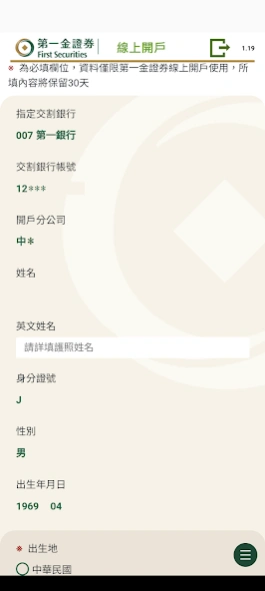


First Gold Securities "e-key account opening" is a tailor-made account opening express train for you. As long as you are a First Bank customer (and have opened an online banking account), prepare your mobile phone and dual certificates, and you can complete the account opening online !
【Account opening features】
No need to face the cabinet, saving you running time
No closing time, open an account if you want to open an account
No need to go to the bank, directly bind the delivery bank account online
There are no piles of account opening documents to fill out, fast and convenient
【Precautions】
1. The applicant must be a natural person of the country who is at least 20 years old
2. Only existing deposit customers of the First Bank can apply for and have applied for an online banking account (the iLEO digital account of the First Bank can also be agreed to be a securities delivery deduction account)
2. When opening an account, you must prepare your ID card and second certification documents (such as health insurance card, driver's license)
If you have any questions, please call our customer service line: 0800-538-080, 02-2511-0801
About 第一金證券 e鍵開戶
The company that develops 第一金證券 e鍵開戶 is 三竹資訊. The latest version released by its developer is 1.23.
To install 第一金證券 e鍵開戶 on your Android device, just click the green Continue To App button above to start the installation process. The app is listed on our website since 2024-03-14 and was downloaded 2 times. We have already checked if the download link is safe, however for your own protection we recommend that you scan the downloaded app with your antivirus. Your antivirus may detect the 第一金證券 e鍵開戶 as malware as malware if the download link to com.mitake.ftsiopen is broken.
How to install 第一金證券 e鍵開戶 on your Android device:
- Click on the Continue To App button on our website. This will redirect you to Google Play.
- Once the 第一金證券 e鍵開戶 is shown in the Google Play listing of your Android device, you can start its download and installation. Tap on the Install button located below the search bar and to the right of the app icon.
- A pop-up window with the permissions required by 第一金證券 e鍵開戶 will be shown. Click on Accept to continue the process.
- 第一金證券 e鍵開戶 will be downloaded onto your device, displaying a progress. Once the download completes, the installation will start and you'll get a notification after the installation is finished.
Program Details
System requirements
Download information
Pricing
Version History
version 1.23
posted on 2024-03-14
修正部分android無法下載之問題
version 1.19
posted on 2022-10-17
1.新增模擬器阻擋功能
2.資安提升及優化
3.修正Android 12以上作業系統之相機功能
